So you’ve decided to create a photobook — wonderful! You’ve registered your account, chosen your format, and you’re ready to start designing. Then you hit the first decision point: do I use the Online Tool or download the Desktop Software?
It’s a question we get asked often, and the honest answer is that both tools are great — they just suit different people and different situations. This guide will walk you through the key differences, the pros and cons of each, and help you figure out which one is the right fit for you.
The Two Tools at a Glance
The Online Design Tool runs directly in your web browser. There’s nothing to download or install — you simply log in to your Photo2Print account, choose your product, and start designing. It works on any device with a modern browser, including your phone or tablet.
The Desktop Software (P2P) is a downloadable application for Windows and Mac. You install it on your computer, design your book offline, and then upload your completed project directly through the software when you’re ready to order.

The Online Tool
Who It’s Best For
The Online Tool is ideal if you want to get started quickly, if you’re designing on a device you don’t fully control (like a work laptop), or if you prefer the flexibility of being able to pick up and put down your project from different devices.
The Benefits
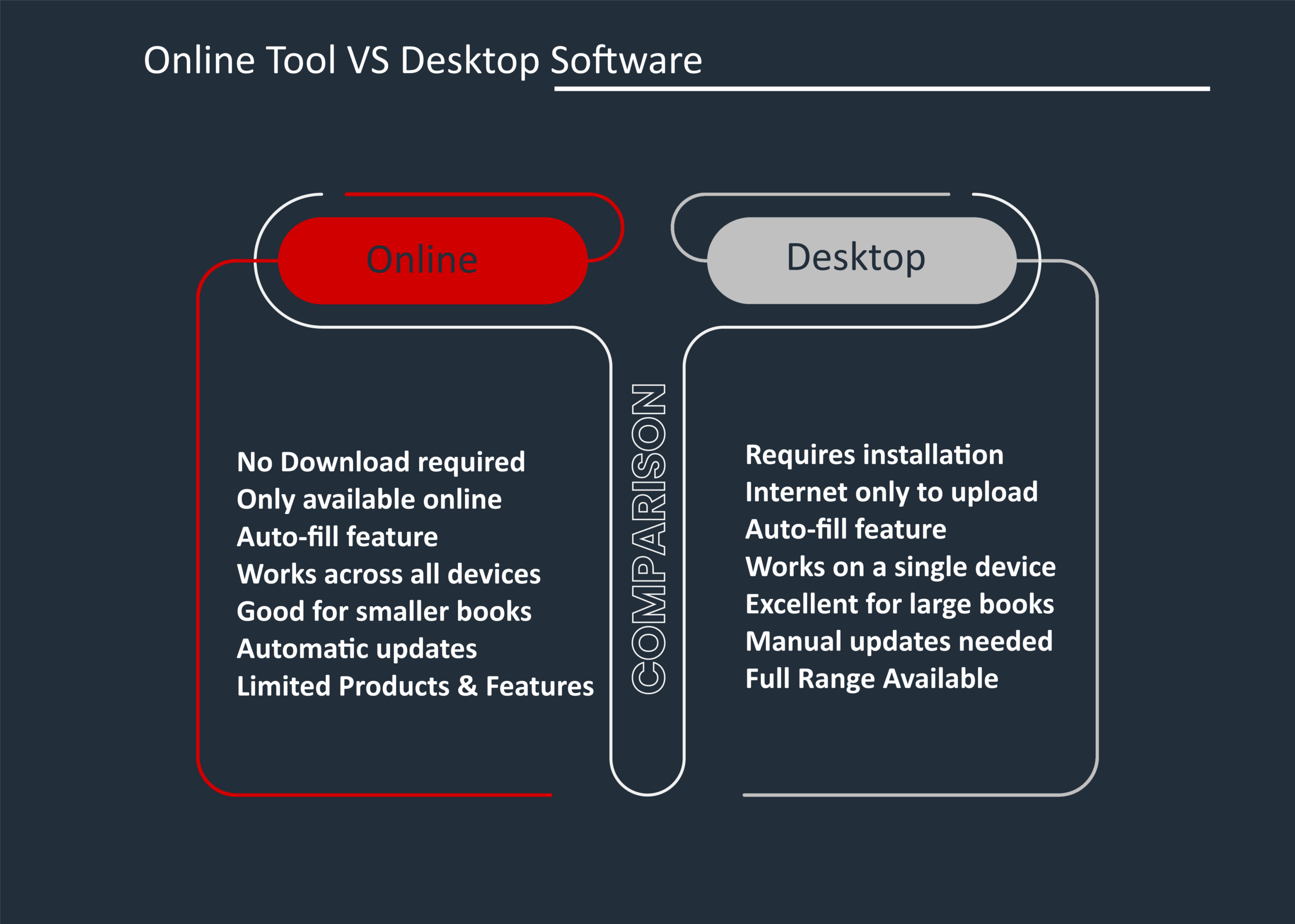
• No installation required. Open a browser, log in, and you’re designing. There’s no waiting for a download and no setup process.
• Access from anywhere. Because your project is saved in the cloud, you can start designing on your laptop at home, continue on your tablet later, and finalise on a different computer — all without losing your work.
• Works on mobile. If you’re someone who manages photos straight from your phone, the Online Tool lets you design from your mobile browser without needing a PC at all.
• Always up to date. There’s no software to update — any improvements or new features are automatically available the next time you log in.
• Great layout flexibility. You can include a varying number of photos per page, add extra pages as you go, and choose from an intuitive range of layouts and themes.
The Drawbacks
• Requires a stable internet connection. If your connection is slow or unreliable, large photo uploads can be frustrating and the design experience may feel sluggish.
• Browser limitations. Occasionally, older browsers or certain browser settings (such as strict privacy extensions) can affect the tool’s performance. For the best experience, use an up-to-date version of Chrome, Firefox, Edge, or Safari.
• Products and feature limitations. Some products and features are only available on the desktop software.
• Session timeouts. If you walk away from your design for an extended period, your browser session may time out — though your saved project will still be there when you log back in.

The Desktop Software
Who It’s Best For
The Desktop Software is a great choice if you have a large number of photos to work with, if you prefer a more traditional design experience, or if you’re working in an area with slow or inconsistent internet.
The Benefits
• Works offline. Once installed, you can design your entire photobook without needing an internet connection. You only need to go online when you’re ready to upload and order.
• Handles large projects well. If you’re creating a big book — a wedding album with hundreds of photos, for example — the Desktop Software can handle large volumes of images smoothly.
• More features and products – Certain products and features are only available on the desktop version of the software. So, if you are looking for a specific product that is not available on the online tool, then the desktop software is your best option.
• Familiar, traditional interface. Many users find installed software more intuitive for detailed, focused design work — especially if they’re used to working with programs like Word or Publisher.
The Drawbacks
• You need to download and install it. This takes a few minutes and requires your computer to meet basic system requirements. On some corporate or company computers, your IT settings may block the installation — in which case, the Online Tool is the better route.
• Antivirus software can sometimes interfere. Occasionally, antivirus programs flag the P2P software during download or installation. If this happens, you may need to temporarily adjust your antivirus settings.
• Tied to one device. Unlike the Online Tool, your Desktop project lives on the computer you installed the software on. You cannot move the files and images to a different computer.
• Requires updates. From time to time, the software releases updates. When prompted, always select “Download all” to ensure you have the full, latest version — designing on an outdated version can occasionally cause upload issues.
Our Recommendation
If you’re new to PHOTO2PRINT, or you’re creating a smaller book (around 20 pages), start with the Online Tool. It’s the quickest way to get designing, and the improved interface makes the whole process feel easy and enjoyable.
If you’re creating a large, photo-heavy book — like a wedding album, a year-in-review book, or a detailed travel photobook — or if you simply prefer working offline, the Desktop Software is a fantastic choice. The auto-fill feature can save you a significant amount of time.
And remember: whichever tool you use, the end product is exactly the same — a beautifully printed, high-quality photobook manufactured right here in South Africa. The tool is just the means to get there.
Not sure which one to try first? Why not give the Online Tool a go right now — no download needed, and your first design is just a few clicks away.